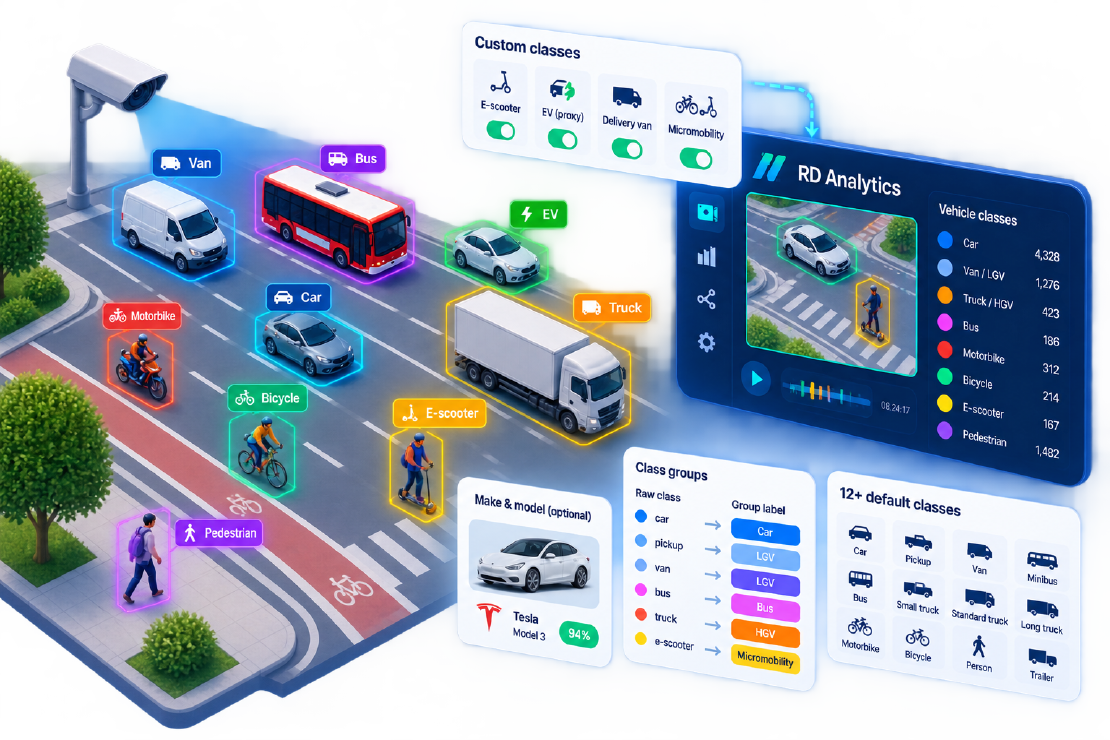
Traffic schemes written a decade ago assumed cars, buses, and trucks. Streets now carry e-scooters, delivery vans, light EVs that look like hatchbacks, and micromobility that behaves like neither bike nor pedestrian. Custom vehicle classification AI is how agencies keep reports honest when the road mix changes faster than the statute book.
This article explains how RD Analytics approaches classification—from built-in 12+ classes to class groups, subclassing, make/model, and custom neural modules—and how that supports briefs such as e-scooter counting AI without pretending every new device is already in the base model.
Why default classes are no longer enough
Standard detector vocabularies (person, bicycle, car, motorbike, bus, truck) still power many studies. They fail when the brief asks for:
- Local highway schemes (UK COBA-style, FHWA-style groups, regional truck classes)
- Micromobility as its own row (e-scooters vs bikes vs pedestrians)
- EV or fleet share proxies for policy
- Hazardous goods, construction plant, or other rare types
Industry posts on fine-grained classification schemes (for example FHWA-style truck classes) underline a hard truth: schemes that depend on axles or rare subtypes need either the right camera view or an honest fallback—not a silently wrong label. Custom classification is as much about report design as about neural nets.
Three layers of classification in RD Analytics
1. Detector and vehicle-class models
Built-in pipelines detect common road users and can refine vehicles into a richer set—aligned with the product’s 12+ classes positioning—for example motorbike, car, pickup, van, mini bus, small/standard/long truck, tractor, special, bus, person, trailer, bicycle, and related types depending on the installed model.
That layer answers most survey tenders without custom development.
2. Class groups (labels your agency already uses)
Class groups in System settings map raw detector names to the labels and colours clients expect. Examples:
- Map
pickup+van→ “LGV” - Map
person→ “Pedestrian” - Leave rare types unassigned so they appear under their own names instead of disappearing
Class groups are the fastest path to “custom classification” for reporting. They do not invent new visual categories; they organise what the models already see into tender language.
3. Extra intelligence: make/model, filters, custom modules
When the brief goes beyond body-type classes:
| Need | RD Analytics approach |
|---|---|
| Brand / model mix (DOOH, fleet studies) | Optional vehicle make/model module (~3,000 models in product positioning) |
| Size- or plate-based subclasses | Subclassing / filters; supervised tuning |
| E-scooters, ADR trucks, niche plant | Custom neural module (developed or ported) into the modular pipeline |
| Regional scheme aliases | Class groups + documentation of the mapping |
Custom module development is a stated Road Data Systems service. If you already own a recognition model, it can be packaged for RD Analytics rather than forcing a second platform.
E-scooters and micromobility: a practical playbook
E-scooter counting AI is a frequent RFP ask. Treat it as an engineering problem, not a checkbox:
- Decide the policy definition — Is a scooter “cycle,” “other,” or its own class? Write that into the method statement.
- Check pixel size — Scooters are small. Camera height and resolution that work for cars often fail for scooters (camera setup guide).
- Prefer dedicated geometry — Separate counting lines on micromobility lanes where possible.
- Choose the recognition path — If scooters collapse into
bicycleorpersonwith stock models, plan a custom module or accept a combined “micromobility” group with QA notes. - QA a peak sample — Manual audit of 10–15 minutes before delivering a citywide “scooter KPI.”
Honest scoping beats a dashboard that invents precision.
EVs and “green” fleet metrics
Most street-level cameras cannot see a battery. EV share from video alone is usually a proxy problem:
- Make/model recognition can flag known EV-only models (incomplete, but directional)
- Number-plate workflows (where legally allowed) can join external registration databases
- Dedicated lane or charging-bay studies may need zones more than new classes
Say so in proposals. Clients trust vendors who separate observed class from inferred powertrain.
Designing a custom scheme without chaos
| Practice | Why |
|---|---|
| Freeze class-group IDs for the project year | Time series stay comparable |
| Document fallbacks (“unclassified truck group”) | Defensible under review |
| Match camera aim to the hardest class | Axles, scooters, plates each need view |
| Keep rare classes out of live ops tiles | Ops want stable KPIs, not long tails |
| Version the mapping in the method statement | Auditors ask |
FHWA-style thinking applies globally: resolve exact classes when the view supports it; fall back to a correct group rather than a wrong exact label.
Getting started in the product
- Enable detection + vehicle classes on a scan.
- Configure class groups to your tender labels.
- Draw lines/zones; process a short clip.
- Build quantity-by-class widgets; export CSV.
- If a required type is systematically missing, talk to Road Data Systems about a custom module—not another year of mislabelled “car.”
Next step: Explore RD Analytics classification or contact us with your target scheme (local highway classes, micromobility, DOOH). Related: counting guide, use cases.